Technical SEO is the foundation that determines whether search engines can find, understand, and rank your content. You can write brilliant content, but if Google can’t crawl it, index it, and serve it efficiently, you’re invisible.
For growth-stage startups competing in AI-powered search environments (ChatGPT, Gemini, Perplexity), technical SEO has become non-negotiable. At SevenSEO, we see technical issues costing startups thousands in wasted customer acquisition spend every month, issues that are entirely preventable.
This guide will walk you through the fundamentals and show you where to focus for maximum impact.
What is technical SEO?
Technical SEO is optimizing your website’s infrastructure to help search engines find, crawl, understand, and index your pages. It increases visibility and rankings in both traditional search and AI-powered platforms.
Think of it as the plumbing and wiring of your digital property. When it works, everything else becomes possible. When it’s broken, nothing else matters.
How complicated is technical SEO?
The fundamentals aren’t difficult to master. Most common issues can be fixed without deep coding knowledge. However, technical SEO can get complex for large sites or when dealing with JavaScript frameworks, server configurations, and advanced implementations.
The good news? For most startups, focusing on the basics delivers 80% of the results with 20% of the effort.
Does technical SEO matter for AI search?
AI search engines still depend on crawlable, well-structured, trustworthy web pages. Technical SEO ensures your site is fast, accessible, and indexable, all of which improve your chances of appearing in AI-driven answers and traditional search results.
Understanding Crawling
Crawling is how search engines discover your content. Google deploys automated bots (Googlebot) that follow links from page to page, mapping out the web. If these bots can’t reach your pages, those pages don’t exist in Google’s eyes.
How crawling works
Search engines grab content from pages and use the links on them to find more pages. You have several ways to control what gets crawled on your site.
Robots.txt
Your robots.txt file (located at yoursite.com/robots.txt) tells search engines which parts of your site they can access. It’s like a bouncer controlling who gets in and where they can go.
Common mistakes:
- Accidentally blocking important pages (homepage, product pages)
- Blocking CSS and JavaScript files search engines need to render your site
- Not having a robots.txt file at all
Here’s a basic, functional robots.txt:
User-agent: *
Disallow: /admin/
Disallow: /cart/
Sitemap: https://yoursite.com/sitemap.xml
This tells all bots they can access everything except admin and cart pages, and points them to your sitemap.
XML Sitemaps
An XML sitemap is a file listing all pages you want search engines to index. It’s like handing Google a roadmap instead of making them wander around hoping to find everything.
Your sitemap should:
- Include only canonical, indexable URLs
- Update automatically when you publish new content
- Be submitted through Google Search Console
- Be referenced in your robots.txt file
Most modern CMS platforms (WordPress, Shopify, Webflow) generate sitemaps automatically.
Internal Linking
Search engines discover pages by following links. Your internal linking structure determines how easily bots navigate your site and how much authority flows to different pages.
Best practices:
- Link from high-authority pages (homepage) to important content
- Use descriptive anchor text with relevant keywords
- Avoid orphan pages (pages with no internal links pointing to them)
- Create a logical site hierarchy
How to see crawl activity
For Google, check the “Crawl stats” report in Google Search Console. This shows how Google is crawling your website.

If you want to see all crawl activity (including AI crawlers), access your server logs. If your hosting has cPanel, you should have access to raw logs and aggregators like AWstats.
Crawl budget
Each website has a different crawl budget, a combination of how often Google wants to crawl a site and how much crawling your site allows. More popular pages and frequently updated pages get crawled more often.
If crawlers detect server stress while crawling, they’ll slow down or stop until conditions improve.
What is Page Indexing
After pages are crawled, they’re rendered and sent to the index, the master list of pages that can appear in search results.
Robots meta tags
A robots meta tag is HTML code that tells search engines how to crawl or index a page. It’s placed in the <head> section:
<meta name="robots" content="noindex">
This tells search engines not to index the page.
“My page is crawled but not indexed. Why?”
Just because Google crawls a page doesn’t mean they’ll index it. Several factors prevent indexing:
Meta robots tags and X-Robots-Header
Check your important pages to ensure they’re not accidentally marked “noindex.” Verify this in Google Search Console under the “Pages” report.
Thin or duplicate content
Google won’t index pages that don’t add unique value. If your content is too short, duplicates existing content, or doesn’t serve user intent, Google may skip indexing.
Signs of thin content:
- Product pages with only manufacturer descriptions
- Blog posts under 300 words with no unique insights
- Pages that are slight variations of others
- Auto-generated content with minimal human input
Canonicalization
Canonical tags tell search engines which version of a page is the “main” one when you have similar or duplicate content.
A canonical tag looks like:
<link rel="canonical" href="https://yoursite.com/original-page">
Every page should have a self-referencing canonical tag pointing to itself, unless you specifically want to consolidate duplicate pages.
How Google selects canonical URLs
When there’s duplicate content creating multiple versions of the same page, Google selects one to store in its index. This process is called canonicalization. Google uses multiple signals:
- Canonical tags
- Duplicate pages
- Internal links
- Redirects
- Sitemap URLs
Check how Google has indexed a page using the URL Inspection tool in Google Search Console. It shows the Google-selected canonical URL.
Technical SEO Quick Wins
One of the hardest things for SEOs is prioritization. Here are projects with the highest impact relative to effort.
Check indexing status
Make sure pages you want people to find can be indexed. This is the single most important technical SEO check.
If important pages aren’t indexed, everything else is irrelevant. Check Google Search Console’s “Pages” report to identify:
- Pages excluded from indexing
- Reasons for exclusion
- Indexing errors
Reclaim lost links
Websites change URLs over time. Old URLs often have links from other websites. If they’re not redirected to current pages, those links are lost and no longer count.
This is the fastest “link building” you’ll ever do.
How to find opportunities:
Check your 404 pages that have backlinks pointing to them. These represent lost link equity you can reclaim with simple 301 redirects.
Use a tool to identify 404 pages with referring domains, then redirect them to the most relevant current page. You’ll reclaim link value without building a single new link.
Add internal links
Internal links are links from one page on your site to another. They help pages be found and rank better.
Look for contextual internal linking opportunities where you mention topics you already have content about. For example, if you mention “customer acquisition cost” in a blog post and you have a dedicated CAC guide, link to it.
Strategic internal linking:
- Links important pages from your homepage
- Uses descriptive anchor text
- Distributes authority to priority pages
- Helps search engines understand site structure
Add schema markup
Schema markup is code that helps search engines understand your content better. It powers rich results that help your website stand out in search results and helps AI systems correctly interpret your content.
For startups, the most valuable schema types:
- Organization schema – Establishes your brand in Google’s knowledge graph
- Product schema – Shows prices, availability, ratings directly in search results
- Article schema – Helps blog posts appear in Google News and AI summaries
- FAQ schema – Gets questions and answers featured in search results
- Review schema – Displays star ratings in search results (powerful for conversion)
Test your schema implementation at schema.org/validator.
Page Experience Signals
These are ranking factors that impact user experience. While they may have less direct ranking impact than content and links, they’re essential for user satisfaction.
Core Web Vitals
Core Web Vitals are Google’s speed metrics measuring user experience:
- Largest Contentful Paint (LCP) – How long until main content loads (aim for under 2.5 seconds)
- Interaction to Next Paint (INP) – How quickly your site responds to user interactions (aim for under 200ms)
- Cumulative Layout Shift (CLS) – How much page elements jump around while loading (aim for under 0.1)
Check these metrics in Google Search Console under “Core Web Vitals” or using PageSpeed Insights.
Quick fixes for faster load times
- Image optimization: Convert images to WebP format and compress them. A 10MB image destroys load time.
- Lazy loading: Load images only when they’re about to appear on screen. Most modern frameworks do this automatically.
- Minimize JavaScript and CSS: Remove unused code and defer non-critical scripts.
- Use a CDN: Content Delivery Networks serve content from servers physically closer to users, reducing load times.
- Enable browser caching: Let browsers store static files so returning visitors load pages faster.
HTTPS
HTTPS protects communication between browsers and servers from being intercepted. Any website showing a “lock” icon in the address bar uses HTTPS.
Google prefers HTTPS sites. If you’re still on HTTP, migrating to HTTPS should be a priority.
Mobile-first indexing
Google now uses the mobile version of your site for indexing and ranking. If your mobile experience is broken, your rankings will be too, even for desktop searches.
Requirements:
- Mobile site needs the same content as desktop
- Touch targets (buttons, links) must be large enough and properly spaced
- Font sizes should be readable without zooming
- Pop-ups shouldn’t block content on mobile
- Page speed is critical on mobile connections
Test your mobile experience at search.google.com/test/mobile-friendly.
Common technical killers
Broken links (404 errors)
Broken links waste crawl budget and hurt user experience. Run regular audits to identify and fix 404s. Either restore content, set up 301 redirects, or remove broken links.
Redirect chains and loops
A redirect chain is when one redirect leads to another, then another. A redirect loop is when redirects form a circle with no end. Both waste crawl budget and slow your site.
Fix by ensuring all redirects go directly to the final destination in a single hop.
Server errors (5xx)
Server errors indicate your website can’t be accessed. Common ones include 500 (internal server error) and 503 (service unavailable). Persistent 5xx errors can cause Google to remove pages from the index.
Monitor server uptime and performance. Frequent 5xx errors mean it’s time to upgrade hosting or optimize backend infrastructure.
JavaScript rendering issues
Many modern sites rely heavily on JavaScript to display content. Search engines sometimes struggle to render JavaScript properly, meaning they might not see your actual content.
If using JavaScript frameworks like React, Vue, or Angular, implement server-side rendering or static site generation. This ensures search engines receive fully rendered HTML.
Technical SEO for AI Search
Traditional SEO focused on Google. Generative Engine Optimization (GEO) means optimizing for AI-powered search engines like ChatGPT, Gemini, and Perplexy. The good news? Solid technical SEO benefits both.
Make your site accessible to LLMs
Like search engines, large language models (LLMs) need to crawl and access your content. However, they work differently from traditional search crawlers.
Most LLMs don’t render JavaScript. If key content or navigation only appears after JavaScript loads, AI crawlers won’t see it. Avoid using JavaScript for mission-critical content you want visible in AI search.
Check whether third-party tools are blocking AI crawlers. For instance, Cloudflare’s default settings may block AI crawlers from accessing content. You’ll need to adjust these settings if you want visibility in AI-driven search.
What AI engines need
AI search engines require:
- Clean, structured content they can parse and cite
- Fast-loading pages they can access efficiently
- Clear information hierarchy they can understand
- Schema markup providing context
- Mobile-optimized experiences for voice queries
Startups winning in AI search aren’t doing anything radically different—they’re just doing technical SEO exceptionally well.
Redirect hallucinated URLs
AI systems may cite URLs on your domain that don’t exist. If you monitor traffic from AI search engines, you might notice visitors arriving at non-existent pages.
If AI systems hallucinate URLs on your domain, redirect those URLs to relevant live pages. This prevents losing traffic and protects brand authority.
AI content detection
While using AI to create content is acceptable, too much AI-generated content can be seen as a spam signal, limiting visibility in both traditional and AI search.
Monitor your content to ensure it maintains quality standards and provides unique value. If using AI assistance, ensure human review and editing to add expertise and originality.
Essential Technical SEO Tools
Google Search Console
Google Search Console is a free service that helps you monitor and troubleshoot your website’s appearance in search results.
Use it to:
- Find and fix technical errors
- Submit sitemaps
- See structured data issues
- Monitor indexing status
- Check mobile usability
- Review Core Web Vitals
Google PageSpeed Insights
PageSpeed Insights analyzes the loading speed of your webpages. It shows performance scores and actionable recommendations to make pages load faster.
Focus on the specific recommendations with the highest impact on your Core Web Vitals scores.
Chrome DevTools
Chrome DevTools is Chrome’s built-in webpage debugging tool. Use it to debug page speed issues, inspect HTML and CSS, and analyze network performance.
From a technical SEO standpoint, it helps you see exactly what’s being loaded, when, and why.
Schema markup validators
Use schema.org’s structured data testing tool to validate your schema markup implementation. This ensures search engines and AI systems can properly interpret your structured data.
Measuring Technical SEO Success
Track these metrics to know if your technical SEO efforts are working:
- Index coverage – Monitor the “Pages” report in Google Search Console. You want increasing indexed pages and decreasing excluded pages.
- Crawl stats – Check how often Google crawls your site and whether you’re seeing crawl errors. Increasing crawl frequency means Google values your content.
- Core Web Vitals – Track improvements in LCP, INP, and CLS over time. These directly impact rankings and user experience.
- Organic traffic – Technical SEO should increase organic traffic. Monitor overall traffic trends and traffic to previously problematic pages.
The Technical SEO Audit Checklist
Run this monthly:
- Check Google Search Console for new crawl errors
- Verify important pages are indexed (not noindexed)
- Run a site speed test and review Core Web Vitals
- Scan for broken links (internal and external)
- Verify XML sitemap is updated and submitted
- Check mobile usability in GSC
- Review server uptime and performance
- Test structured data implementation
- Audit redirect chains and loops
- Monitor for duplicate content issues
Why Startups Can’t Afford to Ignore Technical SEO
For growth-stage startups, every marketing dollar matters. Technical SEO issues don’t just hurt rankings, they directly impact customer acquisition cost (CAC).
Here’s the math: if technical issues reduce organic visibility by 30%, you’re paying 30% more to acquire the same customers through paid channels. At scale, that’s thousands of dollars wasted monthly.
The good news? Unlike content creation or link building, technical SEO fixes tend to be one-time investments with long-term payoffs. Fix site speed once, benefit forever. Implement proper schema once, it keeps working.
At SevenSEO, we see startups who nail technical SEO from day one consistently outperform competitors with better content but worse infrastructure.
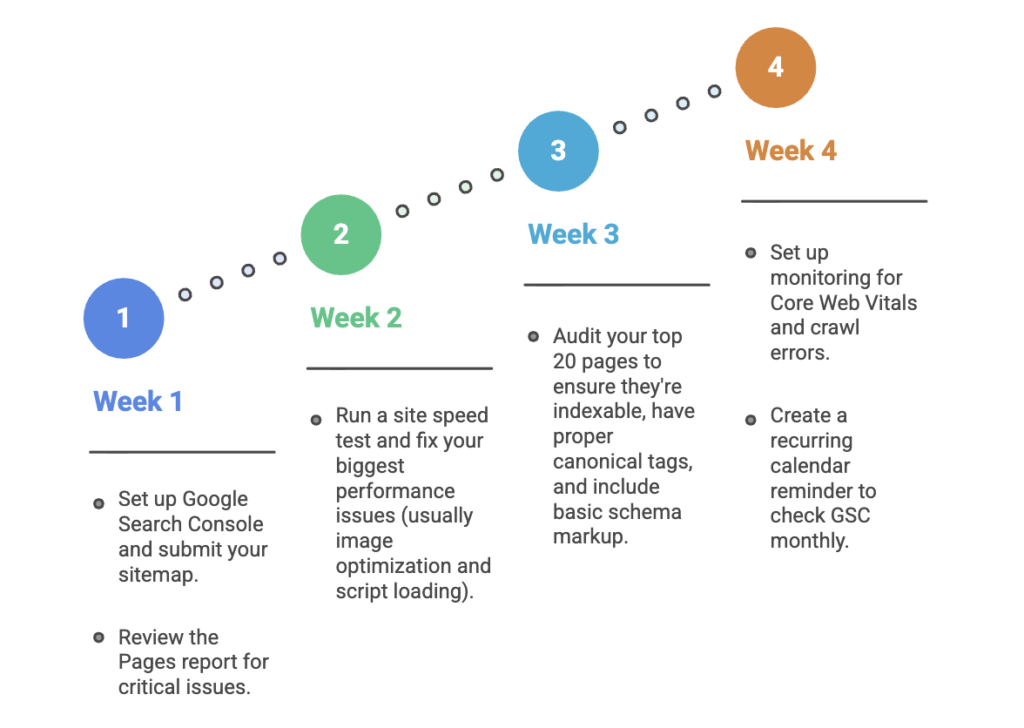
Key Takeaways
- If your content isn’t indexed, it won’t be found in search engines, indexing is the foundation.
- When something breaks that impacts search traffic, it can be a priority. But most sites are better off spending time on content and links once technical foundations are solid.
- The technical projects with the most impact are around indexing and reclaiming lost links.
- Technical SEO still matters for AI search. Well-structured, crawlable pages help AI systems find, understand, and surface your content.
- Most startups ignore technical SEO while burning money on paid ads. That’s your competitive advantage.